
This guide will walk you through setting up the HubSpot & OpenSolar integration to automate project and deal creation, sync contacts, and keep HubSpot deal stages updated with OpenSolar project milestones.
Setting Up Your Integration
Step 1: Log in to Snapflow
Visit https://connect.snapflow.com.au
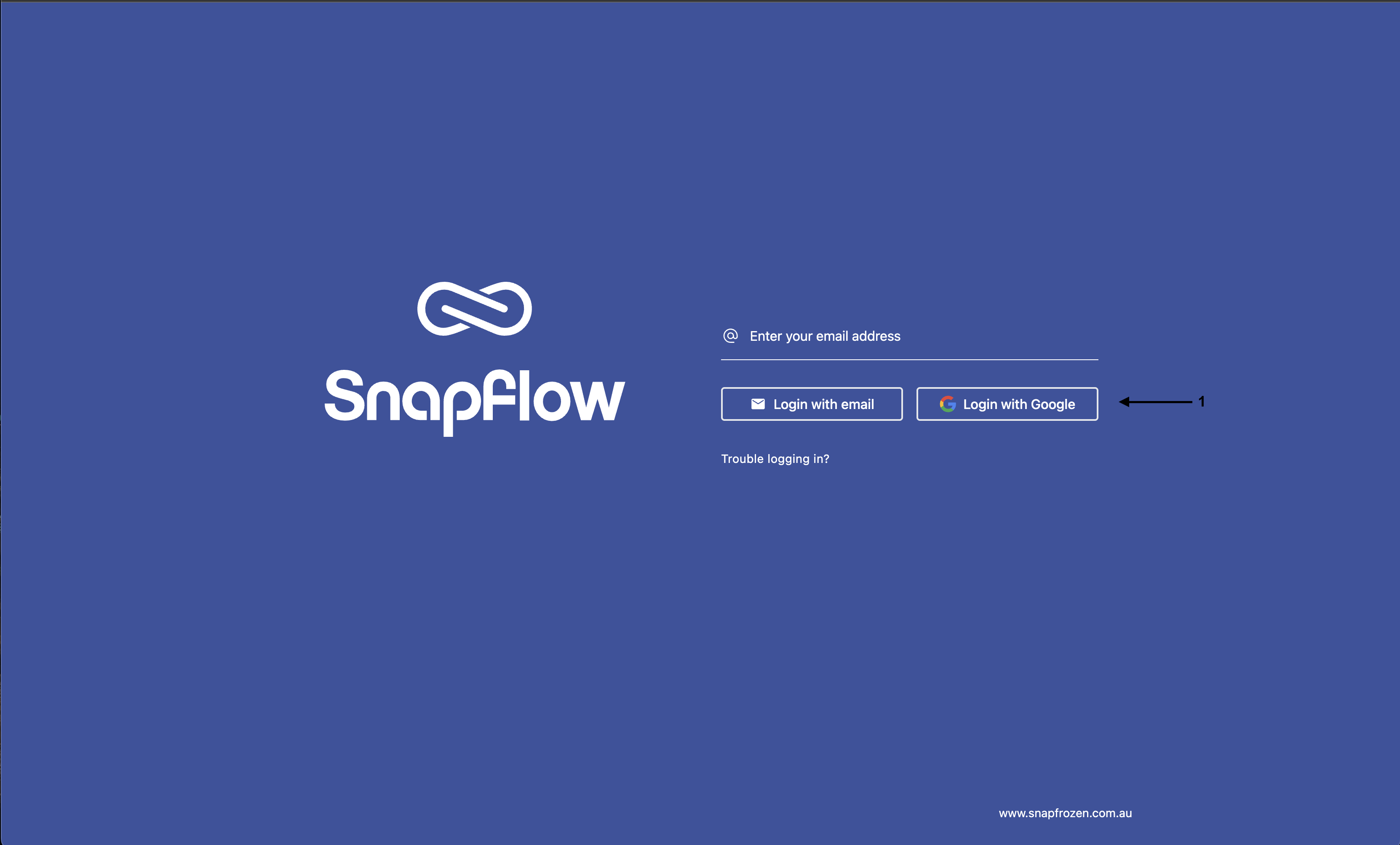
Log in using your email address or sign in with Google. (Please note that you must use the same email address that you used at checkout)
Step 2: Locate the Integration
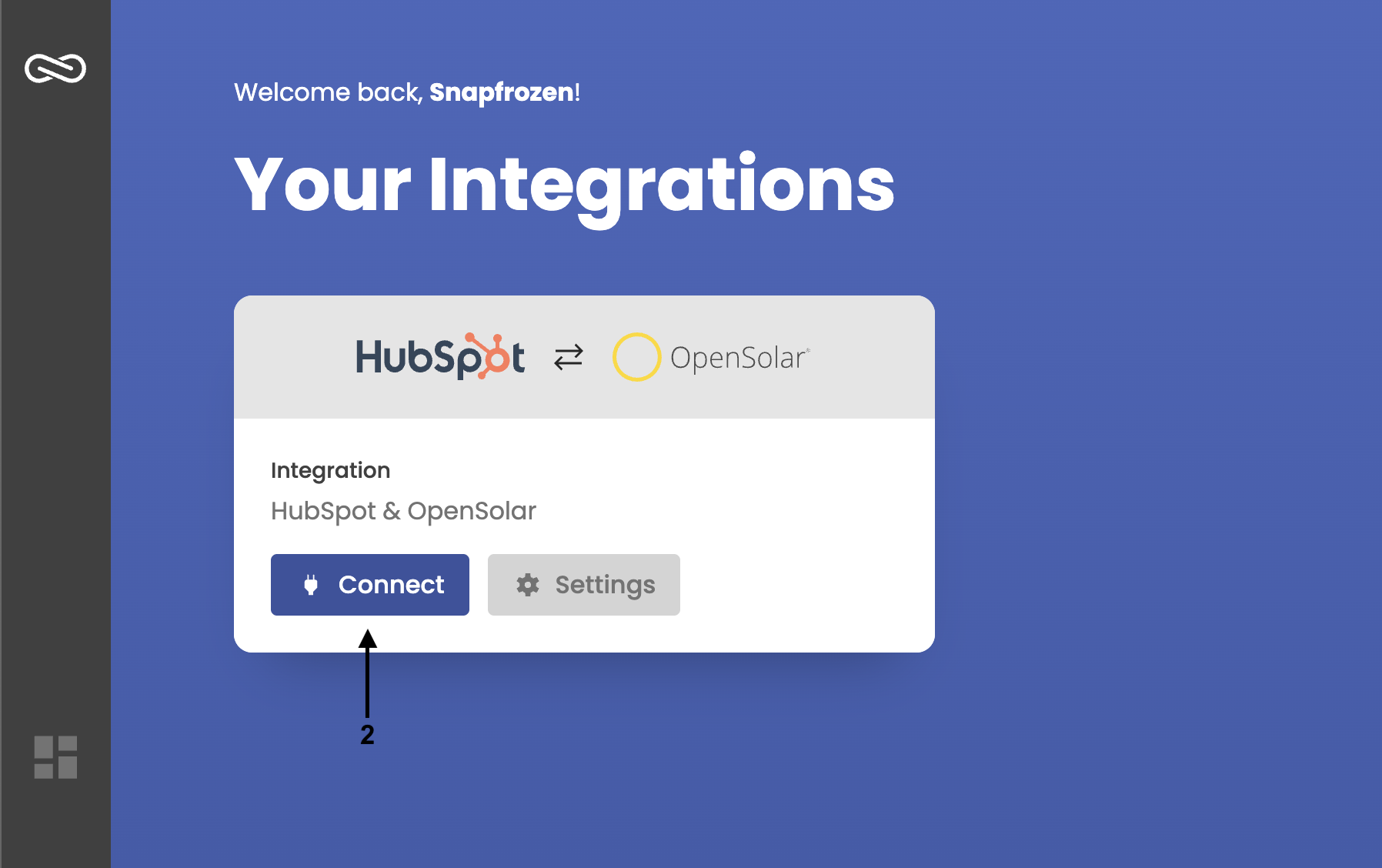
After logging in, you’ll see the HubSpot & OpenSolar Integration tile in your dashboard.
Click “Connect”.
Step 3: Connect Your Accounts
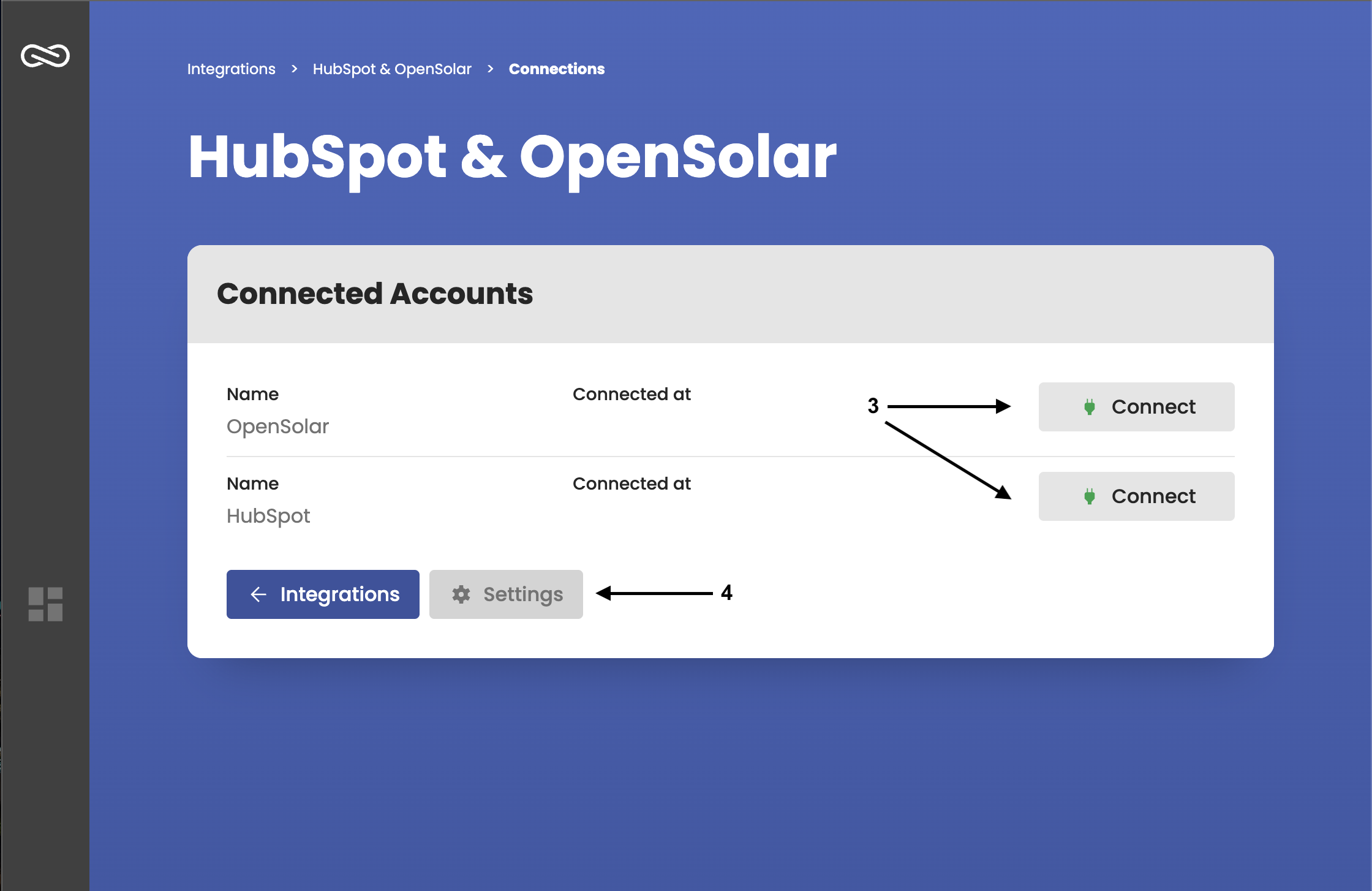
Follow the prompts to connect both your:
-
HubSpot account
-
OpenSolar account (please ensure you use administrator credentials)
If you do not have administrator access to OpenSolar, please ask your administrator to complete this step or assign you the appropriate permissions.
Step 4: Configure the Integration
Once your accounts are connected, the integration setup will begin automatically in the background.
You can go directly to the Settings page to:
-
Choose how data syncs between HubSpot and OpenSolar
-
Enable or disable configuration options to suit your business workflow
Integration Settings
These settings define basic integration parameters.
General Settings
HubSpot Pipeline
-
Select the HubSpot pipeline to select the correct deal stages and that deals should be created in.
-
Example: Sales Pipeline.
Contact Synchronisation Settings
These settings control how contacts are synced between HubSpot and OpenSolar.
Two-way Contact Sync (Default - Recommended)
-
Enables full contact synchronisation – new contacts created in either HubSpot or OpenSolar will be automatically synced to the other platform + Plus any new ongoing changes will be synced.
Sync HubSpot Contacts
-
Only syncs contacts from HubSpot to OpenSolar.
-
New contacts created in HubSpot will appear in OpenSolar, but OpenSolar contacts will not be sent to HubSpot - Changes to created contacts will sync.
Sync OpenSolar Contacts
-
Only syncs contacts from OpenSolar to HubSpot.
-
New contacts created in OpenSolar will appear in HubSpot, but HubSpot contacts will not be sent to OpenSolar - Changes to created contacts will sync.
Project & Deal Creation Settings
These settings automate project and deal creation based on HubSpot deal stages.
Auto-create Project (Default - Recommended)
-
When enabled, a new project is automatically created in OpenSolar when a HubSpot deal reaches a specific stage.
-
Project Creation Stage – Choose which HubSpot deal stage triggers project creation in OpenSolar.
-
Address Source - Choose whether to pull the customer’s address from their Contact Record in HubSpot or Deal Properties. If you store the address inside the Deal, please ensure each address field is setup inside the deal and mapped inside the settings to ensure the project can be created.
Auto-create Deal
-
When enabled, a new deal is automatically created in HubSpot when an OpenSolar project reaches a specific milestone.
-
Deal Creation Stage – Choose which OpenSolar stage should trigger deal creation in HubSpot.
Default Role
When creating an OpenSolar project, (Auto-create Project = On) the HubSpot deal owner is assigned to the project.
-
If a deal owner does not exist when creating the OpenSolar Project, this role will act as a failsafe because a user must be assigned when the project is created in OpenSolar.
Default HubSpot Owner
Similar to the Default OpenSolar Role, when we can’t find a matching HubSpot Deal Owner to the Assigned OpenSolar Team Member, this role will act as a failsafe.
-
Selects the default HubSpot user who will be assigned to newly created deals.
HubSpot Deal Stage Updates
These settings ensure HubSpot deals reflect OpenSolar project progress.
Proposal Sent Stage
-
When a proposal is sent in OpenSolar, the linked HubSpot deal is automatically moved to a user-defined stage (e.g., Proposal Sent).
Proposal Signed Stage
-
When a proposal is signed in OpenSolar, the linked HubSpot deal is automatically moved to a user-defined stage (e.g., Closed Won).
HubSpot Deal Stage Syncing (Available on Professional Plan)
Automatically sync deal stages between OpenSolar & HubSpot.
HubSpot → OpenSolar
-
Map multiple HubSpot Stages to OpenSolar Stages, when the HubSpot deal enters the defined stage, the linked OpenSolar project will be updated to the selected stage.
OpenSolar → Hubspot
-
Map multiple OpenSolar Stages to Hubspot Stages, when the OpenSolar Project enters the defined stage, the linked HubSpot Deal will be updated to the selected stage.
HubSpot Property Syncing (Available on Professional Plan)
-
Enable property syncing (this turns the feature on/off)
-
Configure the HubSpot Stages (When the sync should occur) and the OpenSolar/HubSpot Properties properties you would like to sync.
-
New HubSpot properties can be created inside the dashboard
-
Dropdown select fields automatically append new values as options in HubSpot.
HubSpot CRM Card (BETA)
-
Displays OpenSolar project details directly within the HubSpot deal view.
-
Uses the HubSpot deal ID to match and retrieve OpenSolar project information.
-
Quick Link – Includes a direct link to open the project in OpenSolar.
-
How to add the CRM Card:
Navigate to Deal Record Customisation page and select your view: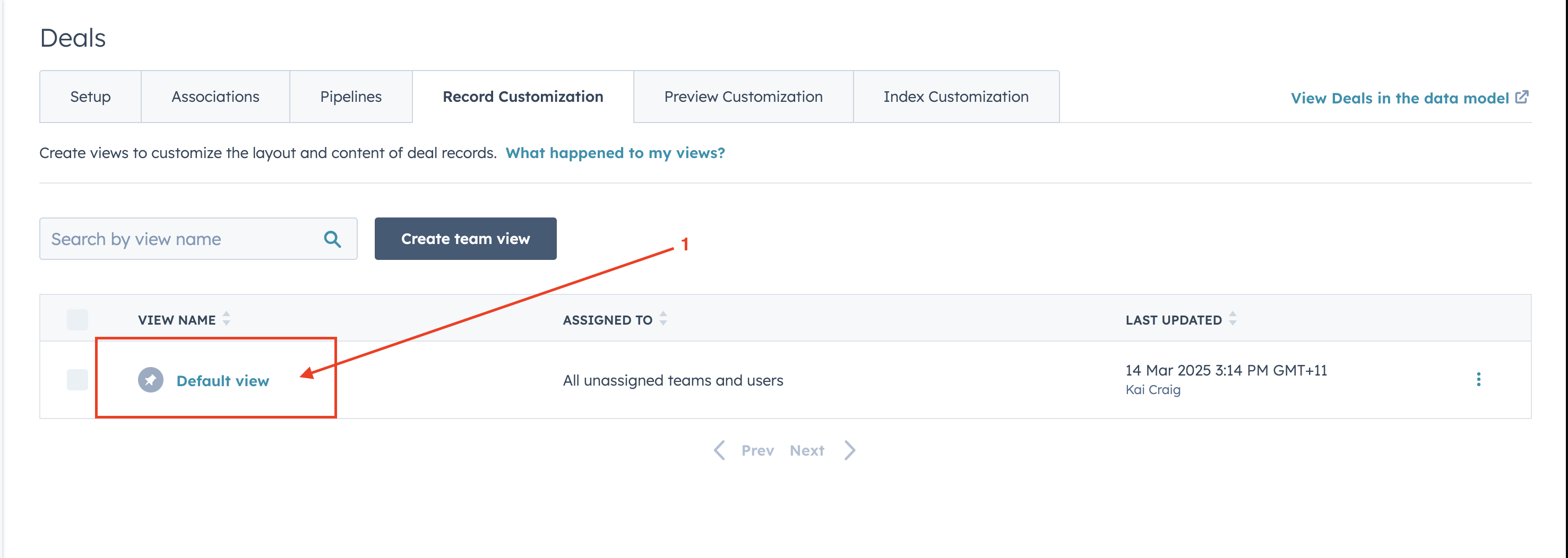
Next inside the tab of your choice, click “add cards” and select the “OpenSolar Project” Card. Place in your own order/position.
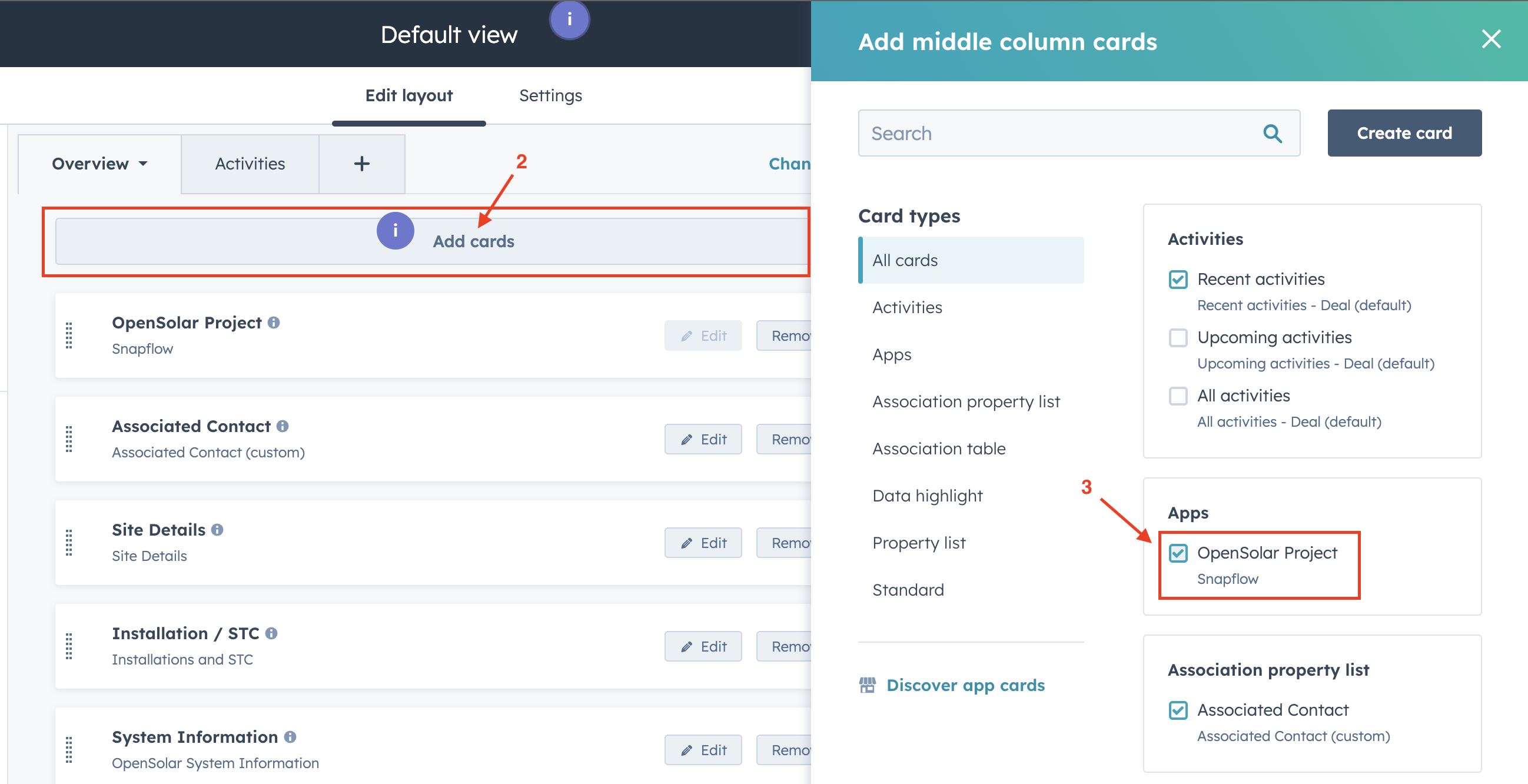
Navigate back to a deal to see the card in action!
Please note the HubSpot CRM Card is still in BETA and we are currently working on adding more fields and improving performance. If you encounter any issues please don’t hesitate to contact support.
Final Steps
Once all settings are configured:
-
Save your settings.
-
Test the integration by creating a test deal in HubSpot or a project in OpenSolar.
-
Verify synchronisation by checking if contacts, projects, and deal stages update as expected.
Frequently Asked Questions (FAQ)
Where does the address come from to create the OpenSolar project?
🔹 The address is pulled directly from the Contact or Custom Mapped Deal Properties in HubSpot. Ensure the contact associated with the deal has a valid address for project creation.
OpenSolar projects aren’t automatically being created when I move my HubSpot deal to the selected stage. What should I check?
If projects aren’t being created, please verify the following:
✅ In Snapflow Settings:
-
Ensure Auto-create Project is ON in the integration settings.
-
Ensure the correct Project Creation Stage is selected in the integration settings.
✅ In HubSpot:
-
The deal has a contact assigned with a First & Last Name and a valid address.
-
The deal has an assigned Owner (HubSpot user).
If all these conditions are met and projects are still not being created, try manually saving the settings again or contact support.
How often do contacts sync?
🔹 Near instant – as soon as an update is detected, it is synced automatically between HubSpot and OpenSolar. There is no need to manually trigger syncs.
Contact Support
Please Submit a Support Ticket or Email: support@snapfrozen.com.au
